Auto Update
Auto updates are enabled by the electron-updater package. Ideally, auto updates are configured to run in a CI pipeline to automatically provision new releases. See publish configuration for information on how to configure your local or CI environment for automated deployments.
Auto updates work as follows:
- You configure the package to build release metadata (
latest.yml) - Electron builder uploads the actual release targets and metadata files to the configured target (except for generic server, where you have to upload manually)
- You configure the Electron application to use auto-updates, which queries the publish server for possible new releases
Read the remainder of this guide to configure everything.
macOS application must be signed in order for auto updating to work.
Auto-updatable Targets
- macOS: DMG.
- Linux: AppImage, DEB, Pacman and RPM.
- Windows: NSIS.
All these targets are default, custom configuration is not required. (Though it is possible to pass in additional configuration, e.g. request headers.)
- Squirrel.Windows is not supported. Simplified auto-update is supported on Windows if you use the default NSIS target, but is not supported for Squirrel.Windows. You can easily migrate to NSIS.
ziptarget for macOS is required for Squirrel.Mac, otherwiselatest-mac.ymlcannot be created, which causesautoUpdatererror. Default target for macOS isdmg+zip, so there is no need to explicitly specify target.
Differences between electron-updater and built-in autoUpdater
The electron-updater package offers a different functionality compared to Electron's built-in auto-updater. Here are the differences:
- Linux is supported (not only macOS and Windows).
- Code signature validation not only on macOS, but also on Windows.
- All required metadata files and artifacts are produced and published automatically.
- Download progress and staged rollouts supported on all platforms.
- Different providers supported out of the box: (GitHub Releases, Amazon S3, DigitalOcean Spaces, Cloudflare R2, Keygen and generic HTTP(s) server).
- You need only 2 lines of code to make it work.
Quick Setup Guide
-
Install electron-updater as an app dependency.
-
Configure the
publishoptions depending on where you want to host your release files. -
Build your application and check that the build directory contains the metadata
.ymlfiles next to the built application. For most publish targets, the building step will also upload the files, except for the generic server option, where you have to upload your built releases and metadata manually. -
Use
autoUpdaterfromelectron-updaterinstead ofelectron:CommonJS
const { autoUpdater } = require("electron-updater")ESM
import { autoUpdater } from "electron-updater"TypeScript
import electronUpdater, { type AppUpdater } from 'electron-updater';export function getAutoUpdater(): AppUpdater {// Using destructuring to access autoUpdater due to the CommonJS module of 'electron-updater'.// It is a workaround for ESM compatibility issues, see https://github.com/electron-userland/electron-builder/issues/7976.const { autoUpdater } = electronUpdater;return autoUpdater;} -
Call
autoUpdater.checkForUpdatesAndNotify(). Or, if you need custom behaviour, implementelectron-updaterevents, check examples below.
Do not call setFeedURL. electron-builder automatically creates app-update.yml file for you on build in the resources (this file is internal, you don't need to be aware of it). Its feed is the first provider that receives the update manifest (publishAutoUpdate not false) in the publish settings of the targets that write update info — a target-level publish such as nsis.publish counts — see which settings become the auto-update feed.
Examples
import { autoUpdater } from "electron-updater"

export default class AppUpdater {
  constructor() {
    const log = require("electron-log")
    log.transports.file.level = "debug"
    autoUpdater.logger = log
    autoUpdater.checkForUpdatesAndNotify()
  }
}
- A complete example showing how to use.
- An encapsulated manual update via menu.
Custom Options instantiating updater Directly
If you want more control over the updater configuration (e.g. request header for authorization purposes), you can instantiate the updater directly.
import { NsisUpdater } from "electron-updater"
// Or MacUpdater, AppImageUpdater

export default class AppUpdater {
    constructor() {
        const options = {
            requestHeaders: {
                // Any request headers to include here
            },
            provider: 'generic',
            url: 'https://example.com/auto-updates'
        }

        const autoUpdater = new NsisUpdater(options)
        autoUpdater.addAuthHeader(`Bearer ${token}`)
        autoUpdater.checkForUpdatesAndNotify()
    }
}
The credential headers in requestHeaders / addAuthHeader — headers such as Authorization, the same set that is removed on a cross-origin redirect — and the query string of the feed url are only sent to the feed's origin (scheme, host and port; as on redirects, an http → https upgrade of the feed host on the default ports keeps the headers and the feed query). With the generic, s3, spaces, r2, keygen, bitbucket, github and gitlab providers, an update file whose URL in latest*.yml is on another origin, and the blockmaps and differential range requests derived from it, are downloaded without them; such a URL keeps its own query string. A blockmap is downloaded from ${url}.blockmap with the file URL's query string, so a pre-signed installer URL's signature does not fit it: set files[].blockMapUrl in latest*.yml to the blockmap's own (pre-signed) URL. A relative value resolves like url (against the feed URL); an absolute URL is used as-is, with its own host and query string. Either follows the same origin rule. With a blockMapUrl, the old version's blockmap comes from the local cache or from previousBlockmapBaseUrlOverride; when neither has it, that one update is downloaded in full, which fills the cache for the next one (the private GitHub and GitLab providers, which resolve files from the release assets, ignore blockMapUrl). With every provider, including custom ones, a URL that electron-updater resolves against the feed URL (such as files[].url or a blockmap) gets the feed query only on the feed's origin. Serve the update files from the feed origin (relative files[].url, the default) or use pre-signed URLs. Signed update manifests cover files[].url and packages.<arch>.path, so a pre-signed URL has to be in latest*.yml before it is signed (see Key storage). A custom provider (one that does not extend a built-in provider such as GenericProvider) declares where these headers go by overriding Provider.feedBaseUrl: return its feed URL to send them only to that origin, or null to send the request headers to every download URL. If it declares neither and the downloads carry credential headers, downloadUpdate() fails with ERR_UPDATER_FEED_BASE_URL_NOT_DECLARED before any download request:
class MyProvider extends Provider<UpdateInfo> {
  get feedBaseUrl(): URL | null {
    return new URL("https://updates.example.com/") // or null
  }
  // getLatestVersion(), resolveFiles(), …
}
Custom downloaded-file verification
All updater classes inherit AppUpdater.verifyUpdateFile, which lets you run your own verification step on an update file before it is allowed to become installable.
If the verification fails, the update is aborted, the file is deleted and an ERR_UPDATER_INVALID_UPDATE_FILE error is emitted.
The hook runs on every path that can lead to an install, so a rejected file can never reach the installer:
| When | updateFilePath points to |
|---|---|
| Right after a fresh download | the file under a temporary name — it is renamed to originalUpdateFileName only after your verification succeeds, so an unverified file is never executable under its real name |
| An update downloaded by an earlier session and reused from the cache | the cached file, under its real name |
| Before an install-on-next-launch spawns the cached installer | the pending installer, under its real name |
Only the first case can quarantine the file under a temporary name; in the other two the bytes are already on disk under their real name from a previous session, and the hook is a re-verification of a file at rest. cancellationToken is set only when the verification belongs to a download.
For NSIS web installers, packageFilePath is also provided and points to the downloaded companion .7z package. It is omitted when no such package was downloaded.
This hook is generic and works across updater implementations. On Windows NSIS updates, the built-in Authenticode verification remains available separately as NsisUpdater.verifyUpdateFileAuthenticodeSignature, and both run — Authenticode first, then your hook.
import { NsisUpdater } from "electron-updater"

const updater = new NsisUpdater()

updater.verifyUpdateFile = async ({ updateFilePath, originalUpdateFileName, packageFilePath, cancellationToken }) => {
  try {
    // Example for your custom code, which can inspect the update file at `updateFilePath`,
    // can use the expected filename `originalUpdateFileName`, and for NSIS web installers can also inspect
    // the downloaded companion package at `packageFilePath`.
    const signatureFile = getCorrespondingSignatureFile(originalUpdateFileName)
    checkSignature(updateFilePath, signatureFile)
    return { response: "success" }
  }
  catch (err) {
    return { response: "failure", message: `${err}` }
  }
}

// assigning null restores the default (a stub that always succeeds)
updater.verifyUpdateFile = null
A failure must carry a message; it is what the emitted error reports as the reason.
Install on Next Launch (Windows/Linux)
When a downloaded update is automatically installed is controlled by autoUpdater.autoInstallEvent ("manual" | "onQuit" | "onNextLaunch", default "onQuit"). With the default "onQuit", the update is installed when the app quits: the updater spawns the installer as a detached process while the app is exiting. If the quit happens because the OS session is ending (shutdown, reboot or log off on Windows), the OS can kill that installer mid-install and leave the app in a broken, partially-uninstalled state (#7807).
electron-updater ≥ 7.0 (electron-builder v27) mitigates this in two ways:
-
Session-end guard (always on). When the OS signals that the session is ending, the on-quit install is skipped and a warning is logged. The downloaded update stays cached and is installed on the next regular quit. Detection is best-effort:
powerMonitorshutdownon macOS/Linux, and theBrowserWindowsession-endevent on Windows (windowless, e.g. tray-only, apps cannot be covered on Windows). -
Install on next launch (opt-in). Instead of installing while quitting, persist the downloaded update and install it at the start of the next launch, when no session teardown can interrupt it:
autoUpdater.autoInstallEvent = "onNextLaunch"With this set, any app quit records the downloaded update as pending instead of spawning the installer. On the next launch the updater fetches fresh update info from your update server, re-validates the cached installer against it (checksum, and code signature on Windows), verifies the pending version is still an installable change (newer than the running app — or a downgrade when
allowDowngradeis enabled), then runs the installer silently and restarts the app. If validation fails or the version is no longer an installable change, the pending state is cleared and the app starts normally.Set
autoInstallEvent = "manual"to disable automatic installation entirely (the downloaded update stays cached until you callquitAndInstall()yourself).A single quit can also be deferred without setting the property:
autoUpdater.quitAndInstall({ isSilent: true, isForceRunAfter: true, waitUntilNextLaunch: true })You can also trigger the pending install explicitly (e.g. before opening your first window):
await autoUpdater.installPendingUpdateIfAvailable()
Per-target behavior
The automatic install at startup only runs for targets that can install the pending update without an elevation/authentication prompt. Targets that always elevate to install (deb/rpm/pacman via pkexec/sudo, per-machine NSIS via UAC) skip the automatic path with a log message and keep the pending update — call installPendingUpdateIfAvailable() explicitly at a moment your app controls to install those.
| Target | Automatic install at next launch | Explicit installPendingUpdateIfAvailable() |
|---|---|---|
| NSIS (per-user) | ✓ | ✓ |
NSIS (per-machine, isAdminRightsRequired) | skipped — would show a UAC prompt at startup | ✓ (UAC prompt) |
| AppImage | ✓ | ✓ |
| deb / rpm / pacman | skipped — package managers always elevate (pkexec/sudo) | ✓ (auth prompt) |
| macOS | n/a — Squirrel.Mac stages updates natively and applies them on relaunch | resolves false |
electron-builder v27 sets isAdminRightsRequired in the update info of every per-machine nsis and nsis-web build (perMachine: true), including assisted installers (oneClick: false) and builds with differentialPackage: false, so their updates are started with elevate.exe and skipped by the automatic install at launch.
autoInstallEvent defaults to "onQuit" in v27; "onNextLaunch" is planned to become the default in v28 to resolve this class of session-end corruption once and for all. macOS is unaffected: Squirrel.Mac natively stages downloaded updates and applies them on relaunch, without a killable installer process (there "onQuit" and "onNextLaunch" behave identically).
Deferring the install to the next launch moves the installer out of the session-end quit — the common #7807 trigger — but it does not make the install itself atomic. If the user launches the app while the OS is already shutting down or rebooting (for example, right before a scheduled restart fires), the automatic startup install spawns the same detached NSIS/AppImage installer, and the OS can still terminate it mid-write.
The session-end guard does not cover this launch window: it is wired into the on-quit path only, and on a fresh launch the shutdown / session-end signal generally arrives after the startup install has already been spawned, so it cannot reliably win the race. The probability is very low — it requires a deferred update, a launch inside the shutdown window, and the OS killing the installer mid-write — and macOS is immune (Squirrel.Mac swaps the app bundle atomically). The only complete fix for NSIS/AppImage is an atomic install, which is out of scope for this feature.
Debugging
You don't need to listen to all events to understand what's wrong. Just set logger.
electron-log is recommended (it is an additional dependency that you can install if needed).
autoUpdater.logger = require("electron-log")
autoUpdater.logger.transports.file.level = "info"
Note that in order to develop/test UI/UX of updating without packaging the application you need to have a file named dev-app-update.yml in the root of your project, which matches your publish setting from electron-builder config (but in yaml format).
In latest version you need force the updater to work in "dev" mode:
autoUpdater.forceDevUpdateConfig = true
If you see this in logs:
APPIMAGE env is not defined, current application is not an AppImage
you need to apply this workaround otherwise update won't continue:
process.env.APPIMAGE = path.join(__dirname, 'dist', `app_name-${app.getVersion()}.AppImage`)
But it is not recommended, better to test auto-update for installed application (especially on Windows). Minio is recommended as a local server for testing updates.
Compatibility
Since electron-builder 27 the generated latest*.yml targets the modern files[] metadata format by default and no longer includes the legacy top-level path/sha512 fields, which are needed only by electron-updater 1.x – 2.15.0.
The electronUpdaterCompatibility option sets the electron-updater compatibility semver range: the electron-updater versions your installed apps ship, which have to read the update files a build publishes (e.g. >=7, >=6, >=1.0.0). Can be specified per platform (e.g. win.electronUpdaterCompatibility). Defaults to >=7. The range decides:
- the
.blockmapformat: the binary map for a range that includes only electron-updater 7 and later, the JSON map (with a build warning) for a range that includes earlier versions; - the legacy fields emitted in addition to
files[]: the top-levelpath/sha512and the Windowssha2checksum for ranges intersecting<2.16.0, and the oldlatest-mac.jsonfor ranges intersecting<2.0.0.
The build fails when the app's own electron-updater is outside the range of a platform it builds (for example electron-updater 6 with the default >=7): upgrade it, or declare a range that includes it. The app's electron-updater is the one in dependencies, else in devDependencies (bundled by webpack, vite and the like), else, with two package.json files, in the development package.json. Where the build writes binary .blockmap files (an NSIS installer, a macOS zip), electron-updater 7.0.0-alpha.0 to 7.0.0-alpha.12, which cannot read it, fail the build as well: upgrade to 7.0.0-alpha.13 or later, or set blockmap to "v2".
Metadata format history:
1.0.0latest-mac.json2.15.0path2.16.0files
Update metadata validated only by the legacy SHA-256 sha2 checksum is deprecated — v27 warns and v28 rejects it (fail-closed). Avoid pinning electronUpdaterCompatibility to a legacy range unless you actually ship 1.x–2.15 clients.
Update security options
Two AppUpdater settings changed or were added in v27. See the Security & Hardening page for the full rationale.
The update manifest (latest*.yml) itself is cryptographically signed and verified before any download as of v27. Publishing a build that emits update metadata fails unless an Ed25519 signing key resolves; updateManifest: false is the only opt-out — see Signed Update Manifests.
Changing a signing key or certificate that installs in the field already trust requires a transition release — see Key Rotation.
disableWebInstaller (now defaults to true)
NSIS web installers download their full payload at install time from a manifest-supplied URL, which may not undergo signature verification. As of v27, AppUpdater.disableWebInstaller defaults to true, so a web-installer update is not loaded unless you opt in.
Unless the flag is false, a web-installer update is rejected with ERR_UPDATER_WEB_INSTALLER_DISABLED — at download time (including an update already cached by a previous launch), before an install on next launch, and at install time.
Installs made by an nsis-web installer built with electron-builder v27+ carry a resources/package-type marker, and NsisUpdater then defaults the flag to false automatically. Set it yourself only for web-installer installs without that marker (installed by an installer built before v27, or with a custom script) or when switching an app from nsis to nsis-web:
import { NsisUpdater } from "electron-updater"
const updater = new NsisUpdater()
updater.disableWebInstaller = false // only if you intentionally ship a web installer
Set it before the app is ready, e.g. right after creating the updater: with autoInstallEvent: "onNextLaunch", a pending web-installer update is checked against the flag when the app is ready, and rejected (its pending-install marker cleared) while the flag is true.
A web update cached by a previous launch, or pending an install on next launch, is used only if its web package still matches the freshly fetched manifest; otherwise it is discarded. The nsis-web installer itself verifies the package electron-updater passes to it and installs its own copy — see Web Installer. Once the app runs the version of that update, NsisUpdater removes the package from its pending cache directory at startup (app ready); the package of an update that is not installed yet, or whose install failed, is kept for the install or a retry. Because the manifest vouches for the web package, don't set updateManifest: false for nsis-web apps: signed update manifests cover its path, SHA-512 and size.
allowUnverifiedLinuxPackages (new)
AppUpdater.allowUnverifiedLinuxPackages (default true, preserving historical behavior) controls GPG signature enforcement when installing .deb / .rpm auto-updates. Because electron-builder does not sign Linux packages itself, the default is permissive; set it to false to enforce signature checks where the package manager supports them:
import { autoUpdater } from "electron-updater"
autoUpdater.allowUnverifiedLinuxPackages = false
Staged Rollouts
Staged rollouts allow you to distribute the latest version of your app to a subset of users that you can increase over time, similar to rollouts on platforms like Google Play.
Staged rollouts are controlled by manually editing your latest.yml / latest-mac.yml (channel update info file).
version: 1.1.0
files:
  - url: TestApp Setup 1.1.0.exe
    sha512: Dj51I0q8aPQ3ioaz9LMqGYujAYRbDNblAQbodDRXAMxmY6hsHqEl3F6SvhfJj5oPhcqdX1ldsgEvfMNXGUXBIw==
    size: 62021782
stagingPercentage: 10
Update will be shipped to 10% of userbase.
If you want to pull a staged release because it hasn't gone well, you must increment the version number higher than your broken release. Because some of your users will be on the broken 1.0.1, releasing a new 1.0.1 would result in them staying on a broken version.
File Generated and Uploaded in Addition
latest.yml (or latest-mac.yml for macOS, or latest-linux.yml for Linux) will be generated and uploaded for all providers except bintray (because not required, bintray doesn't use latest.yml).
Differential updates: .blockmap
For targets that support differential (delta) updates (NSIS on Windows and the macOS update zip; AppImage embeds its map in the binary), electron-builder publishes a block map next to the artifact: a list of content-defined blocks and their hashes. electron-updater compares the new map with the one of the installed version and downloads only the byte ranges that changed, using HTTP Range requests.
One <artifact>.blockmap is published per artifact. Its format follows electronUpdaterCompatibility, since the map is read by the updater already installed in your users' apps:
"v3"(the default whenelectronUpdaterCompatibilityincludes only electron-updater 7 and later, as the default>=7does): an uncompressed binary map that electron-updater fetches in parts withRangerequests. It carries the blocks in a three-level layout (a small table of super-groups, a table of groups of blocks, then one 10-byte record per block), so the updater reads the super-group table, compares it with its cached previous map, fetches only the group entries of the super-groups that changed, compares those, and finally fetches only the records of the groups that changed. The map cost of an update therefore grows with the change, not with the installer size, which is what makes 512 B blocks insideapp.asaraffordable."v2"(the default when the range includes electron-updater 6 or earlier): the gzipped JSON map (~16 KiB blocks) every electron-updater release reads. It is downloaded in full on every update, a fixed cost of roughly 20 bytes per block of the installer. The build warns that it writes this format and why.

The blockmap option overrides the choice: "v2" always writes the JSON map, "v3" the binary map (the build fails when electronUpdaterCompatibility includes electron-updater versions before 7), and "latest" the newest format the range allows, so that a future format is picked up without a config change.
Compatibility: electron-updater tells the two formats apart by the file's first bytes, so latest.yml is the same for both. electron-updater before 7.0 cannot read "v3": an app still on electron-updater 6 that receives a release with a binary map falls back to a full download once ("Cannot download differentially, fallback to full download"), and the update it installs brings an updater that can. From electron-updater 6.8.10 the next update is differential again when the artifact name includes ${version}, as the default names do; 6.8.9 and earlier leave the old block map in their cache, which can make the next update a full download too. With an artifact name without the version (e.g. "${productName} Setup.${ext}") the transition costs two full downloads: electron-updater 6 caches no map for the release it could not read, and the URL electron-updater 7 derives for the installed version's map (the new map's URL with the version replaced) is then the new map's own, so the next update is downloaded in full as well and caches its map ("…because the artifact name has no version: downloading the full update"); the update after it is differential. The same one-time full download happens whenever the format changes between two releases (the first release built with the other format, or a future format under "latest"), because blocks of maps in different formats are not compared; electron-updater 7 logs it once at info. Block maps embedded in an artifact (AppImage, the NSIS web installer's app package) are always "v2".
{
  "electronUpdaterCompatibility": ">=7",
  "blockmap": "v3"
}
The "v3" format pays off most for app-code changes when the asar is stored uncompressed and laid out so that a small edit does not shift the rest of the archive:
{
  "nsis": { "differentialPackage": "store-asar" },
  "asar": { "contentAlignment": 512 }
}
nsis.differentialPackage: "store-asar" stores resources/app.asar uncompressed in the differential package (so a one-line change maps to a few changed blocks instead of a re-compressed archive), and asar.contentAlignment pads file contents inside the asar so that a file growing by a few bytes does not move the offsets of every later file. The "v3" format additionally starts a new block at every packed file of the stored asar, so an edit inside one file never touches a block of its neighbour, and in a build that writes it the 7z header of every differential package is stored as is and chunked on its own, so the CRCs that change with each build cost a few hundred bytes instead of the package's last block (a "v2" build packages exactly as electron-builder 26 did). With all of that, the "v3" rows of the repository benchmark (test/src/differentialOneLineBenchTest.ts) bring a one-line change in a 32 MB asar down to about ten kilobytes on the wire.

How this compares with per-version delta packages (Squirrel, Velopack): those frameworks compute a binary patch between two specific releases on the build machine and publish one delta file per consecutive version pair, which a client applies in sequence from the exact release it has installed. The patch itself is small (a zstd --patch-from diff of a one-line change is a few kilobytes), but every release pair needs its own artifact, a client that skipped releases applies several of them, and the old release must still be present in full. A block map describes a single artifact independently of any previous version: one .blockmap per installer serves updates from any older version, the server only needs HTTP Range support, and the cost of an update is a handful of kilobytes of map plus the changed blocks. The repository benchmark reports both side by side for the same synthetic app.
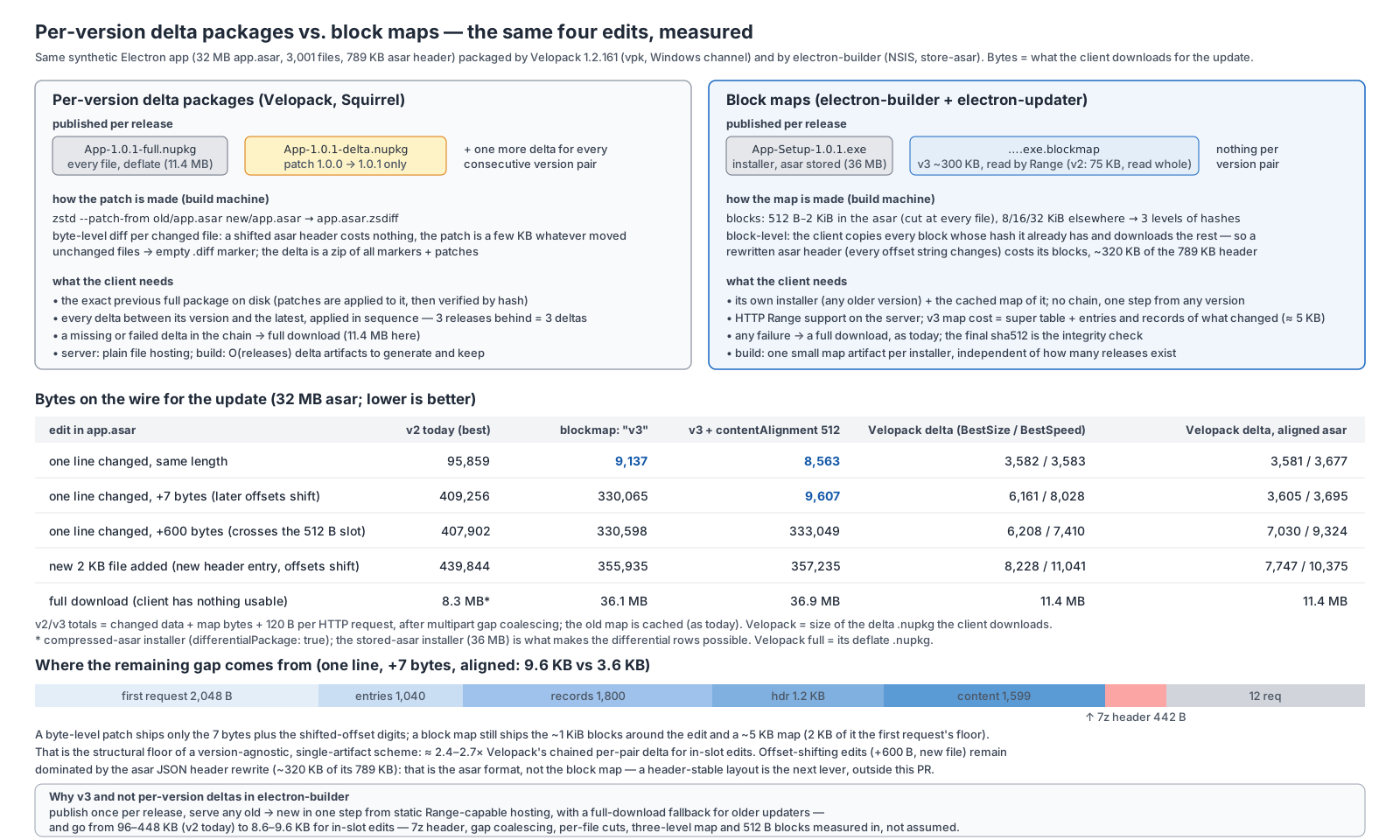
electron-updater also downloads through small gaps between changed ranges (copy gaps below 8 KiB are fetched rather than copied, saving one request per gap on hosts such as GitHub or S3 that serve a single range per request) and never puts more than 200 ranges into one multipart/byteranges request (Apache's default MaxRanges).
Private GitHub Update Repo
You can use a private repository for updates with electron-updater by setting the GH_TOKEN environment variable (on user machine) and private option.
If GH_TOKEN is set, electron-updater will use the GitHub API for updates allowing private repositories to work.
Private GitHub provider only for very special cases — not intended and not suitable for all users.
The GitHub API currently has a rate limit of 5000 requests per user per hour. An update check uses up to 3 requests per check.
Events
The autoUpdater object emits the following events:
Event: error
errorError
Emitted when there is an error while updating.
Event: checking-for-update
Emitted when checking if an update has started.
Event: update-available
infoUpdateInfo (for generic and github providers) Emitted when there is an available update. The update is downloaded automatically ifautoDownloadistrue.
Event: update-not-available
Emitted when there is no available update.
infoUpdateInfo (for generic and github providers)
Event: download-progress
progressProgressInfobytesPerSecondpercenttotaltransferred
Emitted on progress.
Event: update-downloaded
infoUpdateInfo — for generic and github providers.
Event: update-cancelled
infoUpdateInfo
Emitted when an update is cancelled by the user or the download is otherwise aborted.
Event: appimage-filename-updated
pathstring
Emitted after a successful AppImage update when the file is moved to its final location. Only fires on Linux AppImage builds.
UpdateInfo
Interface: UpdateInfo
Extended by
Properties
files
readonlyfiles:UpdateFileInfo[]
minimumSystemVersion?
readonlyoptionalminimumSystemVersion?:string
The minimum version of system required for the app to run. Sample value: macOS 23.1.0, Windows 10.0.22631.
Same with os.release() value, this is a kernel version.
path?
readonlyoptionalpath?:string
Legacy top-level download descriptor for electron-updater 1.x – 2.15.0. Modern clients read files.
Only emitted when electronUpdaterCompatibility includes legacy clients, so it may be absent.
Deprecated
releaseDate
releaseDate:
string
The release date.
releaseName?
optionalreleaseName?:string|null
The release name.
releaseNotes?
optionalreleaseNotes?:string|ReleaseNoteInfo[] |null
The release notes. List if updater.fullChangelog is set to true, string otherwise.
sha512?
readonlyoptionalsha512?:string
Legacy top-level checksum for electron-updater 1.x – 2.15.0. Modern clients read files[].sha512.
Only emitted when electronUpdaterCompatibility includes legacy clients, so it may be absent.
Deprecated
signature?
readonlyoptionalsignature?:string
Base64-encoded Ed25519 signature over the manifest's integrity-critical fields, populated at
publish time when update manifest signing is enabled. Verified by electron-updater against the
configured updateManifestPublicKey before any download starts. See canonicalizeForSigning.
Always the signature of the first configured signing key; signatures carries the same value
(tagged with its key id) plus one entry per additional signing key. Kept so updaters that only know
this single-signature form keep verifying.
signatures?
readonlyoptionalsignatures?:UpdateManifestSignature[]
One Ed25519 signature per signing key the manifest was signed with, each tagged with the id of the
key that produced it (see computeUpdateManifestKeyId). All entries sign the same canonical payload.
A manifest carrying several entries is "dual-signed": an install verifies it as long as any of its
trusted keys matches any entry, which is what makes key rotation possible without a flag day.
stagingPercentage?
readonlyoptionalstagingPercentage?:number
The staged rollout percentage, 0-100.
version
readonlyversion:string
The version.